Set up Apple MDM
Before any Mac can enroll, your workspace needs an Apple MDM push certificate. Oneleet uses it to reach your Macs. You create it once, and it covers both enrollment methods.
Workspace admins set this up. Once the workspace has a Mac or has connected Apple Business, the Devices and Configuration Profiles tabs remind admins to do it, and the Apple MDM Setup tab is marked Not set up until they have. You need a company Apple Account. Use one your company controls, because the same account has to renew the certificate every year.
Create the push certificate
Section titled “Create the push certificate”- In the Oneleet Dashboard, go to Devices and open the Apple MDM Setup tab.
- Enter your company’s legal name, country, and an administrative email, then click Generate CSR. A certificate signing request (CSR) file downloads.
- Sign in to the Apple Push Certificates Portal with your company Apple Account.
- Click Create a Certificate, upload the CSR file, and download the certificate.
- Back on the Apple MDM Setup tab, upload the certificate and click Upload certificate.
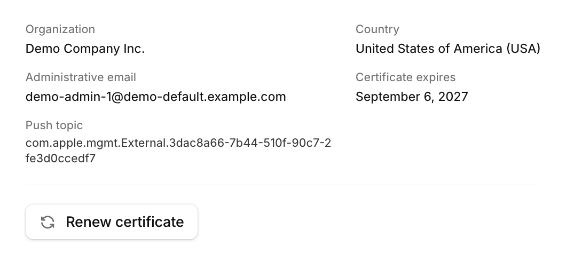
The tab now shows the certificate as Connected, with its expiry date. You can enroll your Macs.
Renew the push certificate
Section titled “Renew the push certificate”The certificate is valid for a year. The Apple MDM Setup tab marks it Expiring soon in its last 30 days. If it expires, Oneleet can’t reach any of your Macs, the Devices and Configuration Profiles tabs show admins a red notice, and the tab is marked Expired. Apple allows renewing for only a limited time after expiry. After that, every Mac has to enroll again.
- On the Apple MDM Setup tab, click Renew certificate, then Generate CSR.
- Sign in to the Apple Push Certificates Portal with the Apple Account that created the certificate.
- Find your Oneleet certificate, click Renew, upload the new CSR file, and download the renewed certificate.
- Upload the renewed certificate on the Apple MDM Setup tab.
If you upload a certificate with a different push topic while Macs are enrolled, Oneleet asks you to confirm with Replace push topic. Confirm only if you can’t renew the existing certificate, for example because you no longer have access to the Apple Account that created it. After you confirm, every enrolled Mac has to enroll again.
Renewal reminders
Section titled “Renewal reminders”Oneleet emails your workspace admins 60, 30, and 7 days before the push certificate or the Apple Business service token expires. Admins with Slack notifications turned on also get a Slack message.
Admins can turn these reminders off under Devices in their notification preferences.